.png?width=150&height=59&name=Ampd_Logo_Full_color%20(3).png)
Prerequisites
-
Admin or appropriate permissions for the relevant Pixel
1. Navigate to Data Sources
-
Go to Meta Business Manager
-
Open Events Manager
-
Select Data Sources
-
Choose your default Pixel
2. Create an Allow List
-
In the Pixel view, go to the Settings tab
-
Scroll to Traffic Permissions
-
Click “Create allow list”
This setting ensures only approved domains can send event data to your pixel.
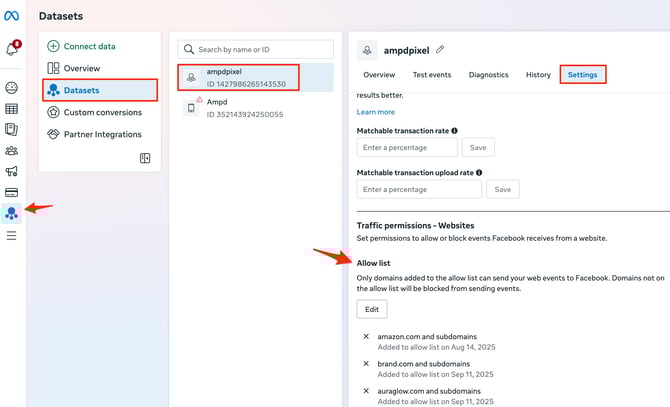
3. Add Amazon Domains
Enter the following domains:
-
www.amazon.com -
amazon.com
These domains must be included so that Meta accepts events routed through Ampd from Amazon.
4. Save Your Settings
-
Click Save to apply the changes
-
Confirm that the domains appear as Allowed
Troubleshooting Tips
-
Ensure you selected the correct Pixel
-
Double-check domain spelling (no typos)
-
Verify that Ampd integration is active and sending events
-
If data isn’t appearing, allow some time for propagation or check Events Manager diagnostics